
Best free Microsoft AI credential for IT pros: Build a generative AI chat app
If you work in desktop engineering, endpoint administration, Intune, support, or PowerShell-heavy IT operations, you do not need another vague “learn AI now” recommendation. You need a credential that is official, free, practical, and relevant to the kind of environments you actually work in.
For Microsoft-heavy IT teams, the strongest free place to start right now is Microsoft’s Applied Skills credential: Build a generative AI chat app.
This is not a generic video course completion badge. It is a Microsoft credential tied to a hands-on assessment. That matters.
It also maps better to where enterprise IT is going: internal copilots, knowledge assistants, guided troubleshooting tools, chatbot-style service experiences, and AI-enabled workflows around documentation, support, and automation.
Quick verdict
| Category | Verdict |
|---|---|
| Cost | Free |
| Provider | Microsoft Learn |
| Credential type | Microsoft Applied Skills |
| Difficulty | Intermediate |
| Best for | Microsoft-heavy IT pros, desktop engineers, Intune admins, support engineers moving into AI |
| Worth doing? | Yes, especially if you want an official free Microsoft AI credential with practical value |
| Biggest limitation | It is more useful if you already have some scripting or development comfort |
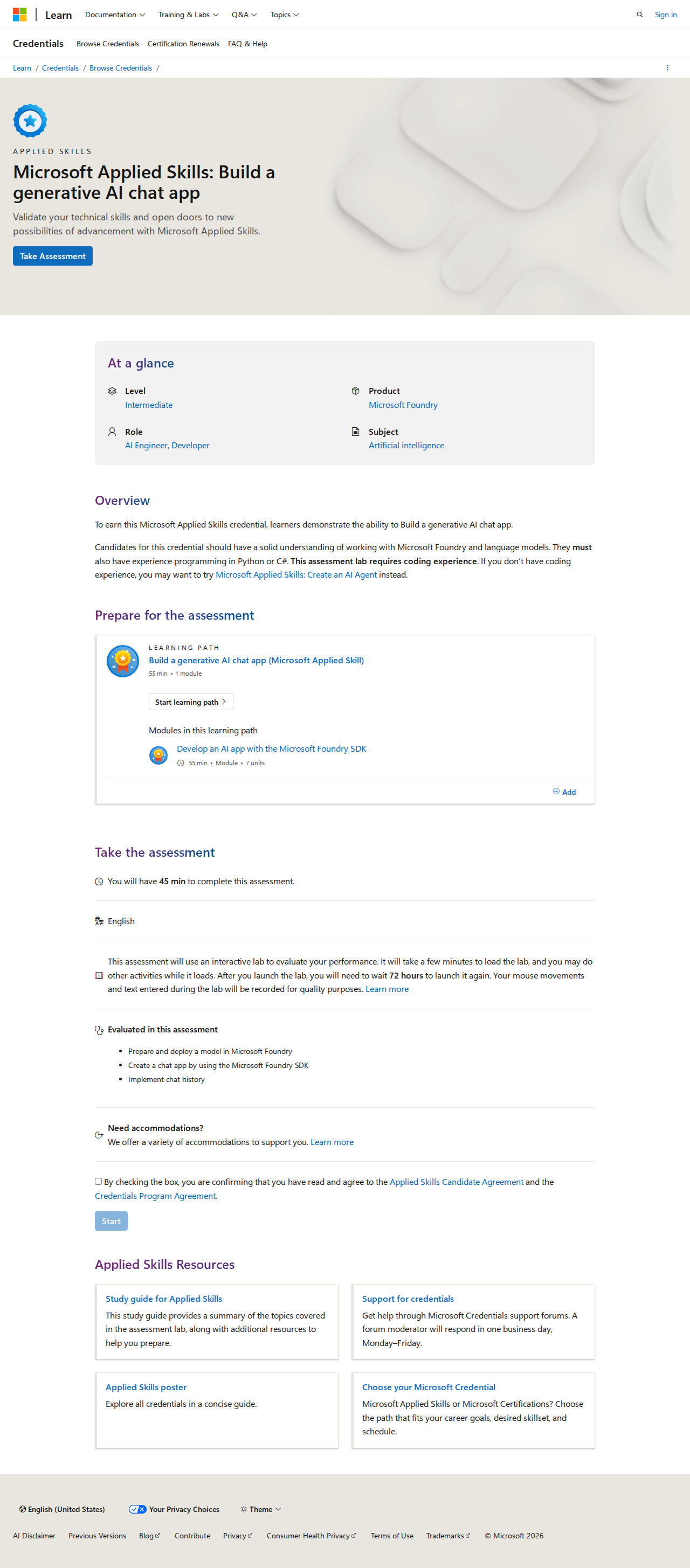
Official credential page: https://learn.microsoft.com/en-us/credentials/applied-skills/build-a-generative-ai-chat-app/
Why this credential matters for desktop engineers
At first glance, “build a generative AI chat app” sounds like something for app developers, not desktop engineers.
That is too narrow.
A lot of the practical AI work happening in IT now looks like this:
- internal helpdesk assistants
- policy lookup copilots
- runbook question-answer bots
- onboarding knowledge assistants
- troubleshooting copilots for support teams
- chat interfaces on top of internal documentation
Desktop engineering teams do not always need to build these tools from scratch, but they absolutely benefit from understanding how they work.
That is what makes this credential useful.
It teaches the thinking behind AI chat applications:
- how models are used in apps
- how prompts shape outputs
- how chat history works
- how deployment and testing fit together
- where practical implementation details matter more than hype
For a desktop engineer, that translates into better judgment when you are:
- evaluating Copilot-style tools
- working with an AI automation team
- building internal support tools with developers
- prototyping IT assistants for documentation or triage
- deciding whether an AI workflow is useful, risky, or just marketing noise
What the credential actually is
This credential is part of Microsoft Applied Skills.
Microsoft Applied Skills are different from classic Microsoft certification exams. They are meant to validate real-world task performance in a narrower skill area. They are shorter and more targeted than a broad certification track.
For this credential, Microsoft positions the skill around building a generative AI chat app. The credential page identifies it as an Applied Skills credential and uses an interactive lab-style assessment rather than a traditional multiple-choice-only certification model.
That is one of the biggest reasons it stands out.
A lot of free AI learning content stops at passive familiarity. This one moves closer to applied capability.
What you learn
Based on Microsoft’s official credential page and assessment overview, the credential is focused on practical generative AI application work rather than just AI definitions.
Core areas include:
- preparing and deploying a model in Microsoft Foundry
- creating a chat app using the Microsoft Foundry SDK
- implementing chat history
- working through an interactive assessment environment
That means the value is not just “what is AI?”
The value is understanding how a real AI-enabled app is put together.
For desktop engineers, that knowledge is useful because a growing number of enterprise tools are wrapping AI behind simple chat interfaces. If you understand the moving parts underneath, you are much less likely to overtrust the output or misunderstand what the tool can actually do.
Who this credential is best for
Best fit
This credential is a strong fit for:
- desktop engineers in Microsoft environments
- Intune administrators who want practical AI familiarity
- support engineers moving toward automation or internal tooling
- PowerShell-savvy IT pros who want a real Microsoft AI credential
- technical professionals evaluating Copilot or chatbot projects
Okay fit
It can also make sense for:
- helpdesk engineers planning a move into endpoint engineering
- sysadmins expanding into Azure and AI tooling
- junior IT pros who are motivated and already comfortable learning technical labs
Weak fit
It is a weaker first choice if:
- you want a pure beginner, zero-friction AI introduction
- you are uncomfortable with technical labs
- you mainly want non-technical AI awareness training
In those cases, IBM SkillsBuild or Google’s beginner generative AI path may be a softer first step.
Real-world value for IT and desktop engineering
Here is the key question for Zakitpro readers:
Will this help you in actual desktop engineering work?
Not directly in the way a PowerShell or Intune credential would.
But it does help in an increasingly important adjacent way.
1. It improves your judgment around AI tools
Many IT teams are being asked to adopt Copilot-style assistants before they really understand prompt behavior, model boundaries, or what happens when chat context gets messy.
This credential gives you more technical intuition.
That helps when you are deciding:
- whether an AI assistant is safe for operational use
- whether a chatbot output is grounded or generic
- whether a proposed internal AI tool is realistic
- how much validation is still required before acting on AI output
2. It helps you participate in AI projects instead of just watching them happen
Even if you never become the person writing the app, you may be the person who provides:
- endpoint data context
- service desk workflow logic
- support knowledge base structure
- troubleshooting decision trees
- validation requirements
Teams that understand how AI chat apps are built contribute much more effectively to real implementation projects.
3. It is a better story on a résumé than a random AI completion certificate
“Completed a free AI course” is weak.
“Earned a Microsoft Applied Skills credential in generative AI application development” is stronger.
It signals:
- Microsoft ecosystem alignment
- practical skill effort
- initiative beyond basic awareness
- relevance to where enterprise tooling is going
That does not replace deep technical experience, but it can strengthen your positioning if you are trying to move into more modern endpoint, automation, cloud, or AI-adjacent roles.
Assessment format and difficulty
According to Microsoft’s credential page, this Applied Skills assessment uses an interactive lab environment.
That is important because it changes how you should approach preparation.
This is not the kind of credential you cram for by memorizing glossary terms. You need to understand the flow of the work.
What makes it intermediate
The credential is labeled intermediate, and that feels fair.
Why?
Because even though the scope is narrower than a broad certification, it assumes you can work through practical technical tasks in a Microsoft environment.
If you already have experience with:
- Microsoft admin tooling
- basic scripting logic
- API/app concepts at a high level
- learning through labs rather than just reading
then this is a realistic stretch target.
If you are starting from zero technical depth, it may feel steep.
Prerequisites: what helps before you attempt it
You do not necessarily need to be a developer by job title, but it helps if you already understand some of the following:
- basic Python or C# familiarity
- how apps use APIs and SDKs at a basic level
- prompt-and-response workflow thinking
- Microsoft cloud concepts
- how to follow a guided lab without getting lost in the tooling
For most desktop engineers, the ideal preparation stack looks like this:
- AI fundamentals first
- prompt literacy and safe-use basics second
- then this Microsoft Applied Skills credential
That is why I would not call this the absolute first AI learning step for every IT reader.
But I would call it the best first free Microsoft AI credential for technical IT professionals who want something more serious than passive awareness training.
Pros
Official Microsoft credential
This is the biggest advantage. If you work in Microsoft-heavy environments, official Microsoft learning carries more weight than random third-party AI course sites.
Free
A lot of recognized AI credentials are paid. This is one of the better official free options in the Microsoft ecosystem.
Practical, not just theoretical
The interactive lab model makes it more useful than passive content consumption.
Strong ecosystem relevance
Zakitpro readers often work in environments that already depend on Microsoft tooling. That makes this credential easier to justify and easier to connect to real work.
Good bridge into future AI-enabled IT roles
Even if your day job is still endpoint admin today, understanding AI app workflows positions you better for where enterprise support and automation are headed.
Cons
Not purely desktop-engineering-specific
This is still an AI app credential, not an Intune or PowerShell certification.
You need to be honest about that. The value is adjacent and strategic, not a direct replacement for core endpoint skills.
Might be too technical for absolute beginners
If you are just trying to understand what generative AI is, start with a softer foundation first.
Less recognizable than major broad certifications
Hiring managers may instantly recognize Azure Administrator or Security+ more often than Applied Skills. You may need to explain what it is in context.
Best value depends on your direction
If you never plan to touch AI-enabled tooling, internal copilots, or modern app-assisted IT workflows, it may be less useful than a more directly operational credential.
Is it better than AI-900 for desktop engineers?
This is a smart question.
The short answer:
- if you want free and practical, this is more attractive right now
- if you want a classic exam-style Microsoft certification, AI-900 is still more conventional
AI-900 is broader and often better known as a certification name.
But AI-900 is usually a paid exam path, and it is more foundational and conceptual.
This Applied Skills credential is more task-oriented.
For Zakitpro readers who want a free first move, this credential often makes more sense before paying for broader Microsoft AI certification tracks.
Is employers recognize it?
Not every hiring manager will know the exact credential name immediately.
But the combination of:
- Microsoft branding
- practical lab-based positioning
- generative AI relevance
- free but official credential status
makes it much stronger than generic course certificates.
The best way to present it on LinkedIn or your résumé is with context.
Instead of just listing the title, tie it to practical skills:
- Microsoft Applied Skills credential in generative AI chat application workflows
- demonstrated hands-on skill with Microsoft AI app concepts and chat implementation patterns
- applied understanding relevant to enterprise AI assistants and support tooling
That makes the value clearer.
My verdict for Zakitpro readers
If you are a desktop engineer, Intune admin, support engineer, or Microsoft-focused IT pro who wants a free official AI credential, this is the best first Microsoft option to prioritize.
It is not perfect.
It is not the easiest beginner course on the internet.
And it is not a direct replacement for the core endpoint skills that still matter most in real jobs.
But it is:
- official
- free
- practical
- future-facing
- relevant to Microsoft-heavy IT environments
That combination is rare.
If your goal is to build credible AI literacy without wandering into low-value certificate spam, this is worth your time.
Official certification page
Use the official Microsoft Learn page here: https://learn.microsoft.com/en-us/credentials/applied-skills/build-a-generative-ai-chat-app/
If you pursue it, always work from the official page, not third-party summary sites.
FAQ
Is this really free?
Yes. At the time of writing, Microsoft presents this as an Applied Skills credential with an assessment path on Microsoft Learn rather than a traditional paid certification exam route.
Is this good for desktop engineers specifically?
Yes, with an important caveat: it is more strategically useful than operationally specific. It helps you understand AI-enabled app workflows that increasingly affect enterprise support and tooling.
Should beginners start here?
Only if they are comfortable with technical labs. If not, start with a lighter AI fundamentals path first, then come back to this.
Is this better than random free AI course certificates?
Yes. Official Microsoft branding plus hands-on assessment makes it much more credible.
Should I do this before AI-900?
If your priority is free, practical, and Microsoft-specific, yes. If your priority is a broader classic exam certification, AI-900 may still be the better next step later.
Final recommendation
If you want one free Microsoft AI credential to put on your radar first as an IT professional, make it this one.
It is one of the few options that balances official recognition, zero cost, practical assessment, and real relevance to where enterprise desktop engineering is heading.
Then pair it with stronger core operational skills in Intune, PowerShell, troubleshooting, and endpoint security. That combination is much more valuable than chasing AI buzzwords alone.
Related reading on Zakitpro
If you want Penny to keep building this certification cluster, the best next article is IBM SkillsBuild Artificial Intelligence for desktop engineers.